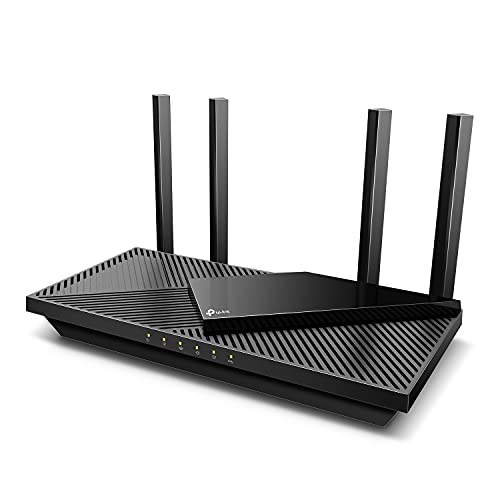
Wi-Fi 6 stopped being the new thing and became the sensible thing. These are the routers worth buying at the bottom of the price curve, and the point at which paying more starts to make sense.
How this page is funded: some links here are affiliate links, and Mesh & Signal earns a commission if you buy through them. It costs you nothing extra, it never changes which product we rank first, and we do not publish a price we have not verified. Full disclosure.
Buy the TP-Link Archer AX55. It is AX3000 dual-band Wi-Fi 6 with measured throughput behind it from TechGearLab's lab, a complete feature set, and a price that makes the whole Wi-Fi 7 conversation optional for a normal household. The budget pick is the Archer AX21 — AX1800 instead of AX3000 — which is the cheapest router on this site we are willing to recommend and is genuinely enough for an apartment on a 300 Mbps plan. If you want the gaming firmware rather than a faster radio, the Netgear Nighthawk XR1000 is the reason to spend more.
Why a Wi-Fi 6 router still makes sense in 2026
Wi-Fi 6 is two generations old, which has done something useful to its price rather than to its capability. The things it introduced — OFDMA, so the router can serve many small clients in one transmission, and better handling of dense device counts — are exactly what a house full of phones, laptops, TVs and smart plugs needs. The things it lacks are the 6 GHz band and Wi-Fi 7's 320 MHz channels and Multi-Link Operation, all of which matter most when you have a multi-gig internet plan and a short, clear path to the router.
So the honest test is your internet plan and your house. On a plan at or below a gigabit, in a home where the router is not on the far side of three brick walls, a good Wi-Fi 6 router is not the limiting factor — is Wi-Fi 7 worth it works through the arithmetic, and Wi-Fi 7 versus Wi-Fi 6 sets out what the generation actually changed.
What we ranked on
Throughput for the money. The published class — AX1800, AX3000 — read alongside measurements from outlets that run labs, rather than the number on the box alone.
Features. Port count and speed, USB, VPN support, mesh or AiMesh-style expansion, and whether anything useful is held back behind a subscription.
Software. How good the app and the admin interface are, and how long the vendor keeps shipping firmware for the model.
Value. The score that dominates in this category, because the whole reason to buy Wi-Fi 6 in 2026 is the price.
The three routers, side by side
Router
Class
Bands
LAN ports
TP-Link Archer AX55
AX3000
Dual-band, 2.4 + 5 GHz
4 x Gigabit
Netgear Nighthawk XR1000
AX5400
Dual-band, 2.4 + 5 GHz
4 x Gigabit
TP-Link Archer AX21
AX1800
Dual-band, 2.4 + 5 GHz
4 x Gigabit
Published specifications. Manufacturer figures and named reviews; see Sources.
Scroll the table sideways to see every column.
Every router in this generation that is still worth buying has Gigabit LAN ports, and that is the real ceiling of the tier. If you have a plan faster than a gigabit, or you intend to wire a NAS or a multi-gig switch, the port is the reason to move up rather than the radio — routers under $200 and the Wi-Fi 7 roundup are where the 2.5 Gbps ports start.
This usually backfires
Do not buy Wi-Fi 6 to fix a coverage problem
A newer router does not have longer range. Transmit power is regulated and every router here sits at the same ceiling, so swapping an older box for a Wi-Fi 6 one gives you more capacity in the rooms that already work and almost nothing in the room that does not. Will a new router be faster is the honest answer, and if the problem is a dead zone the fix is placement, an access point or a mesh system — not a generation.
What to buy
Most homes, gigabit plan or slower: the Archer AX55.
Apartment, 300 Mbps, want to spend as little as possible: the Archer AX21.
Console gaming and you want the traffic tools: the Nighthawk XR1000.
Multi-gig plan, or wiring the house: skip the generation. Start at cheap Wi-Fi 7 instead.
How we picked
We do not run a test lab. Rankings here are built from the manufacturers' published specifications, measurements taken by independent outlets that do have labs, and the structural reasoning on this site about what a given house or job actually needs. Every product was checked as currently sold before it was included. Where a figure appears it is attributed and linked in Sources; where we have no basis for a claim, it is left out. Our methodology sets out exactly what we will and will not assert.
Quick picks
Ranked by our published scoring rubric (throughput for the money, features, software, value). Tap any row to jump to the full write-up, or go straight to the retailer from the right-hand column. How we score.
#
Product
Best for
Score
Price
1
TP-Link Archer AX55AX3000 dual-band Wi-Fi 6 with a full feature set and TechGearLab's measured throughput behind it. The point where spending less starts costing you something real.
Netgear Nighthawk XR1000Netgear's Nighthawk Pro Gaming firmware — per-device bandwidth allocation, latency dashboards, geo-filtering — on Wi-Fi 6 hardware. Buy it for the software, not the radio.
TP-Link Archer AX21AX1800 dual-band Wi-Fi 6, four Gigabit LAN ports, TP-Link's own published specification and nothing surplus. The budget pick, and genuinely enough for an apartment on a 300 Mbps plan.
Prices as of November 13, 2026, read from each product's own Amazon listing; Amazon prices change often. Scroll the table sideways on a narrow screen. Scores are our editorial assessment from published specifications and independent testing by named outlets — not our own lab results. What we do and do not test.
The picks in full
#1 · The Wi-Fi 6 router to buy
TP-Link Archer AX55
TP-Link · Budget tier
The budget router reviewers keep recommending: AX3000 Wi-Fi 6, a USB 3.0 port, and measured throughput that embarrasses its price bracket.
Key specifications
Standard
Wi-Fi 6, AX3000
Measured
823.7 Mbps at 15 ft in TechGearLab testing
At distance
Still usable at 70 ft in the same testing
Extras
USB 3.0, OFDMA, WPA3
Score 8.8/10
Throughput for the money9.0
Features8.5
Software8.0
Value9.5
What it gets right
+Independent testing measured over 800 Mbps at close range, which is more than most households ever ask of a router
+OFDMA and WPA3 at this price, so it handles a device-heavy home and does not force you to weaken security
+A genuinely better box than almost any ISP-supplied gateway it would replace
What to watch for
−Wi-Fi 6 dual-band — no 6 GHz, so it is no escape from a congested apartment building
−Gigabit ports only, so it caps a multi-gig plan
−Street price hovers right around the $100 line and moves with sales, so check before you count on a bracket
#ad Price as of November 13, 2026; Amazon prices change often. How we are funded.
#2 · A gaming-first Wi-Fi 6 box
Netgear Nighthawk XR1000
Netgear · Midrange
The value gaming pick, and the only one here running DumaOS — whose geo-filter lets you restrict matchmaking to servers inside a radius you draw.
Key specifications
Standard
Wi-Fi 6
Firmware
DumaOS, with geo-filter and per-device prioritization
Position
Widely rated the best value in gaming routers
Score 8.1/10
Throughput for the money7.5
Features9.0
Software8.5
Value7.5
What it gets right
+The DumaOS geo-filter is a genuinely distinctive feature: draw a radius on a map and the game will only connect to servers inside it, which is a real latency win on titles with poor matchmaking
+Per-device and per-application prioritization that is easier to reason about than most consumer QoS
+Far cheaper than the Wi-Fi 7 flagships while solving the same class of problem
What to watch for
−Wi-Fi 6, so no 6 GHz band and no multi-link operation
−Gigabit-class wired ports only, which caps a multi-gig plan
−The geo-filter only works on supported titles, so check yours before buying for that feature
#ad Price as of November 13, 2026; Amazon prices change often. How we are funded.
Common questions
What is the best Wi-Fi 6 router?+−
The TP-Link Archer AX55 for most homes — AX3000 dual-band Wi-Fi 6, four Gigabit LAN ports, a complete feature set and measured throughput from TechGearLab behind it. The Archer AX21 is the cheaper AX1800 version and is enough for an apartment on a 300 Mbps plan, and the Netgear Nighthawk XR1000 is worth the premium only if you want its gaming traffic tools.
Is Wi-Fi 6 still good enough in 2026?+−
For most households, yes. Wi-Fi 6 introduced OFDMA and much better handling of many simultaneous clients, which is what a house full of phones, TVs and smart devices actually needs. What it lacks is the 6 GHz band and Wi-Fi 7's wider channels, and those matter when your internet plan is faster than a gigabit. On a gigabit-or-slower plan, the Wi-Fi 6 router is rarely the bottleneck.
Will a Wi-Fi 6 router improve my range?+−
No. Transmit power is regulated and every consumer router sits at the same legal ceiling, so a new generation does not reach further. What a newer router improves is capacity and efficiency in the areas that already have signal. If a specific room is dead, the fix is placement, a wired access point or a mesh node — not a newer router.
Should I buy Wi-Fi 6 or wait and buy Wi-Fi 7?+−
Buy Wi-Fi 6 if your plan is a gigabit or slower and you want to spend as little as possible on something that will serve a normal household for years. Buy Wi-Fi 7 if your plan is faster than a gigabit, if you want 2.5 Gbps LAN ports for a NAS or a switch, or if you are buying a mesh system where the extra radio capacity goes into the backhaul.