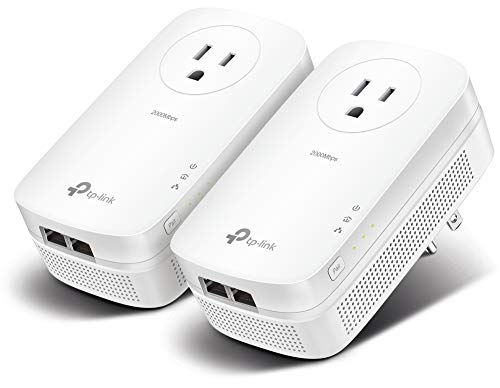
A room with no coax and no cable route still has a power outlet. Powerline is the fix that uses it — and the one product category where your house, not the hardware, sets the speed.
How this page is funded: some links here are affiliate links, and Mesh & Signal earns a commission if you buy through them. It costs you nothing extra, it never changes which product we rank first, and we do not publish a price we have not verified. Full disclosure.
Buy the TP-Link TL-PA9020P KIT if you want the best powerline link your wiring can give you: AV2000 rated, two Gigabit ports on each end and a passthrough plug. Buy the TL-PA7017P KIT instead — the budget pick — if you have never used powerline in this house before, because it costs meaningfully less, delivers roughly 80% of the performance, and powerline is the one networking category where the house decides the result. If HomePlug adapters disappoint or refuse to pair, the Comtrend PG-9172AC is the G.hn answer and handles older wiring better.
The honest version of how powerline works
A powerline adapter modulates network data onto your mains wiring. Plug one into a socket near the router and run a short Ethernet cable to it; plug the second into a socket in the problem room and run a short cable to the device. You now have a wired link without drilling anything. That is genuinely useful and it is why powerline keeps its place in a 2026 toolkit.
The catch is that the ratings on the box — AV1000, AV2000, "up to 2 Gbps" — are laboratory figures measured on clean, short, single-phase wiring. Your house has none of those things. BroadbandNow and HighSpeedInternet's powerline coverage both make the same point: real throughput commonly lands at a fraction of the rating, and the variables are the age of the wiring, the distance the circuit actually travels back to the panel, which breaker each outlet is on, and what else is plugged in.
This usually backfires
Do not plug a powerline adapter into a surge protector or power strip
A surge protector filters exactly the high-frequency content a powerline adapter uses to carry data, and a cheap strip can kill the link outright. Both adapters go straight into a wall socket. That is also why the passthrough models matter: the adapter occupies the outlet and gives you a filtered socket back on its own face, so you are not forced into a strip.
What we ranked on
Rated throughput. The published standard — AV1000, AV2000, G.hn 1.2 Gbps — read as a ceiling you will not reach rather than a speed you will get.
Ports and plug. How many Ethernet ports each end gives you, and whether the adapter hands the wall socket back. Two ports in the problem room is the difference between feeding a TV and feeding a TV and a console.
Tolerance of bad wiring. The score that actually decides satisfaction. G.hn is weighted up here on the published behavior of the standard in older and cross-phase installations.
Value. Cost against what the link will realistically carry in a normal house, not against the rated number.
HomePlug AV2 or G.hn — pick one and stay there
Kit
Standard
Rated
Ports per adapter
TP-Link TL-PA9020P KIT
HomePlug AV2
AV2000, up to 2 Gbps
2 x Gigabit
Comtrend PG-9172AC
G.hn
Up to 1.2 Gbps
1 x Gigabit
TP-Link TL-PA7017P KIT
HomePlug AV2
AV1000
1 x Gigabit
Published specifications. Manufacturer figures; see Sources.
Scroll the table sideways to see every column.
The two standards cannot talk to each other. A G.hn adapter will not pair with a HomePlug AV2 adapter at all, no matter whose name is on it, so the choice you make on your first kit is the choice you are stuck with when you add a third room. HomePlug AV2 has the bigger ecosystem and the cheaper hardware; G.hn is the more robust signal on wiring that is old, long or split across circuit phases.
The practical route is to start with the cheap AV1000 kit. If it pairs and gives you a usable, stable link, buy more HomePlug. If it pairs and gives you 60 Mbps on a gigabit plan, or will not pair at all between those two rooms, the problem is your wiring and G.hn is the upgrade worth paying for — not a more expensive AV2 kit.
Where powerline sits against the alternatives
Against a Wi-Fi extender, powerline wins on consistency and loses on convenience — powerline versus Wi-Fi extender is the full comparison. Against mesh it is cheaper and more limited: powerline versus mesh covers when one box of hardware beats a whole system. And if the room has a cable TV outlet, stop reading and buy MoCA adapters instead — coax is a far better medium than mains wiring, and MoCA versus powerline explains why.
What to buy
Never tried powerline in this house: the TL-PA7017P KIT. Cheap enough to be a test.
It worked, and the room needs two wired devices: the TL-PA9020P KIT.
It did not work, or the house is old: the Comtrend PG-9172AC and the G.hn standard.
There is coax in the room: MoCA, not powerline.
How we picked
We do not run a test lab. Rankings here are built from the manufacturers' published specifications, measurements taken by independent outlets that do have labs, and the structural reasoning on this site about what a given house or job actually needs. Every product was checked as currently sold before it was included. Where a figure appears it is attributed and linked in Sources; where we have no basis for a claim, it is left out. Our methodology sets out exactly what we will and will not assert.
Quick picks
Ranked by our published scoring rubric (rated throughput, ports and plug, tolerance of bad wiring, value). Tap any row to jump to the full write-up, or go straight to the retailer from the right-hand column. How we score.
#
Product
Best for
Score
Price
1
TP-Link TL-PA9020P KITAV2000 rated, two Gigabit ports on each adapter so one run feeds a console and a TV, and a passthrough socket so you do not lose the outlet. The most capable HomePlug kit here.
Comtrend PG-9172ACG.hn rather than HomePlug AV2, rated up to 1.2 Gbps. The one to reach for when AV2 adapters either refuse to pair or pair and crawl — it copes better with noisy wiring and different circuit phases.
TP-Link TL-PA7017P KITAV1000, one port per end, passthrough plug, and roughly 80% of the AV2000 kit's performance. The budget pick, and the sane first purchase — powerline is always a bet on your wiring.
Prices as of November 13, 2026, read from each product's own Amazon listing; Amazon prices change often. Scroll the table sideways on a narrow screen. Scores are our editorial assessment from published specifications and independent testing by named outlets — not our own lab results. What we do and do not test.
The picks in full
#1 · The kit to buy if powerline works in your house
TP-Link TL-PA9020P KIT
TP-Link · Midrange
The powerline kit to buy: AV2000 rated, a passthrough plug so you do not lose the socket, and two gigabit ports on each end.
Key specifications
Rating
AV2000, up to 2 Gbps rated
Ports
2 Gigabit Ethernet per adapter
Plug
Passthrough AC socket
Real-world
Depends entirely on your house wiring
Score 8.8/10
Rated throughput9.5
Ports and plug10.0
Tolerance of bad wiring7.0
Value8.0
What it gets right
+Two Ethernet ports per end means one run can feed a console and a TV
+Passthrough plug keeps the outlet usable, which matters more than it sounds
+Works where Wi-Fi genuinely cannot — a detached garage on the same panel, for example
What to watch for
−The rated speed is a laboratory number; your electrical wiring sets the real one
−Adapters on different circuit breaker phases can lose most of their throughput
−Surge protectors and some appliances will interfere with it
#ad Price as of November 13, 2026; Amazon prices change often. How we are funded.
Common questions
What is the best powerline adapter?+−
The TP-Link TL-PA9020P KIT is the best powerline kit here: AV2000 rated, two Gigabit ports on each adapter and a passthrough socket. But the better first purchase for most people is the cheaper TL-PA7017P KIT, because powerline performance is set by your house wiring rather than the adapter, and the AV1000 kit tells you whether powerline works in your home for much less money.
Why is my powerline adapter so slow?+−
Almost always the wiring rather than the adapter. The three usual causes are the two outlets sitting on different circuit breaker phases, a long circuit path back to the panel even though the rooms are close together, and interference from appliances or a surge protector on the same circuit. Rated speeds such as AV2000 are laboratory maximums on clean short wiring; a real house takes a large share of that.
Can I mix powerline adapters from different brands?+−
Only if they use the same standard. HomePlug AV2 adapters from different brands will generally pair with each other, and G.hn adapters will pair with other G.hn adapters, but HomePlug and G.hn cannot communicate at all. Mixing ratings within one standard works and the link runs at the slower adapter's pace, so an AV1000 adapter paired with an AV2000 one gives you an AV1000 link.
Is powerline better than a Wi-Fi extender?+−
For a fixed device in a specific room, usually yes, because the link back to the router does not share airtime with the Wi-Fi you are using. For covering a whole floor with Wi-Fi, usually no, because a powerline adapter delivers an Ethernet port rather than coverage unless you buy a model with a built-in access point. The deciding question is whether the problem is one device or one room.