Nearly every extender worth owning costs less than this. So the real question at this cap is not which is best - it is whether an extender is the right purchase at all.
How this page is funded: some links here are affiliate links, and Mesh & Signal earns a commission if you buy through them. It costs you nothing extra, it never changes which product we rank first, and we do not publish a price we have not verified. Full disclosure.
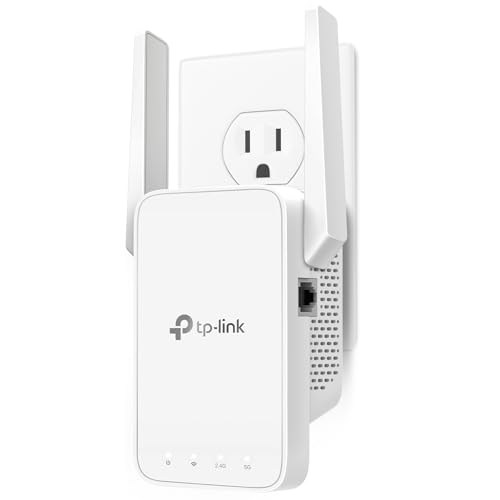
Under $100 the extender to buy is the TP-Link RE700X: AX3000 Wi-Fi 6, the same specification class as TP-Link's pricier RE715X in a different shell, so you should simply buy whichever of the two is cheaper on the day. The budget pick is the TP-Link RE315 — AC1200, about 1,600 sq ft and 32 devices on TP-Link's claim — which is the right call for one weak room with light traffic and the wrong one for everything else. If your router is a Netgear, the EAX17 is the equivalent buy inside that app.
The price cap, checkedAs of November 13, 2026, 2 of the 3 extenders below with a readable listing price were under $100: TP-Link RE700X at $99.99, TP-Link RE315 at $22.97. Amazon prices move daily and a cap is a bracket, not a guarantee — the Quick picks table re-reads every number from the listing, so trust the button over the headline on any given day.
Read this before you buy any of them
An extender listens to the router and talks to your laptop on the same radio, so the bandwidth it can give you is roughly half what it receives — and it receives a weakened signal, because it is sitting where the signal is already poor. Do Wi-Fi extenders slow down your internet has the full mechanism. That halving is not a defect of a cheap extender; it is the category.
Which is why the honest version of this page starts with three cheaper or better alternatives. Move the router first — router placement is free and fixes more dead rooms than any purchase. If the room has a coax outlet, a MoCA pair gives you a real wired link for not much more. If you can run one Ethernet cable, a ceiling access point is a different class of fix. An extender is the right answer when none of those is possible and the need is modest.
What we ranked on
Throughput class. AX3000 versus AC1200 — the headline class, read as a ceiling rather than a delivery.
Ethernet port. Whether you can plug a TV or a console into the extender, which converts the halving problem into a non-issue for that one device.
Roaming behavior. Whether the extender presents itself as part of the same network — EasyMesh and similar — or as a second network your phone clings to in the wrong room.
Value at the cap. Heavily weighted, because this is a category where spending more than necessary is the common error.
The three extenders under the cap
Extender
Class
Coverage claim
Notes
TP-Link RE700X
Wi-Fi 6, AX3000
Same class as the RE715X
Buy whichever is cheaper
Netgear EAX17
Wi-Fi 6, AX3000
Netgear's RE715X equivalent
WPA3 support
TP-Link RE315
Wi-Fi 5 class, AC1200
~1,600 sq ft, 32 devices
One room, light use
Manufacturer-published specifications and claims; see Sources.
Scroll the table sideways to see every column.
One model worth naming even though it misses the cap: TP-Link's RE715X sits a little above $100 and is our pick on the main extender roundup for its gigabit Ethernet port and EasyMesh roaming. If it has drifted under $100 on the day you look — these three trade places constantly — take it.
Try this first
Place the extender between the router and the dead zone
Netgear's own guidance is 25 to 40 feet from the router, in line of sight where possible, and never chained behind another extender. The instinct is to put the extender in the room with no signal, which guarantees a weak link back to the router and a bad result. Halfway is the rule, and Wi-Fi extender not working covers the rest of the failure modes.
For the same field narrowed by generation instead of by price, see the best Wi-Fi 6 extenders — three of the four picks there sit at or near this cap anyway.
How we picked
We do not run a test lab. Rankings here are built from the manufacturers' published specifications, measurements taken by independent outlets that do have labs, and the structural reasoning on this site about what a given house or job actually needs. Every product was checked as currently sold before it was included. Where a figure appears it is attributed and linked in Sources; where we have no basis for a claim, it is left out. Our methodology sets out exactly what we will and will not assert.
Quick picks
Ranked by our published scoring rubric (throughput class, ethernet port, roaming behavior, value at the cap). Tap any row to jump to the full write-up, or go straight to the retailer from the right-hand column. How we score.
#
Product
Best for
Score
Price
1
TP-Link RE700XAX3000 Wi-Fi 6, the same specification class as TP-Link's dearer RE715X in a different shell. Buy whichever of the two is cheaper the day you look.
Netgear EAX17Netgear's direct answer to the RE715X: AX3000 with WPA3. The better buy if your router is already a Netgear and you want one app and one support line.
TP-Link RE315AC1200, about 1,600 sq ft and 32 devices on TP-Link's claim. The budget pick, and an honest fit: browsing and video in one room, not gaming and not a whole floor.
Prices as of November 13, 2026, read from each product's own Amazon listing; Amazon prices change often. Scroll the table sideways on a narrow screen. Scores are our editorial assessment from published specifications and independent testing by named outlets — not our own lab results. What we do and do not test.
The picks in full
#1 · The best extender under the cap
TP-Link RE700X
TP-Link · Midrange
The same AX3000 class as the RE715X in a different shell — buy whichever of the two is cheaper the day you look.
Key specifications
Standard
Wi-Fi 6, AX3000
Relationship
Same spec class as the RE715X and RE705X
Score 8.6/10
Throughput class9.0
Ethernet port8.5
Roaming behavior8.0
Value at the cap9.0
What it gets right
+Functionally interchangeable with the RE715X, and frequently discounted
+Gigabit Ethernet port for access-point mode
What to watch for
−The model sprawl in this range is genuinely confusing
#ad Price as of November 13, 2026; Amazon prices change often. How we are funded.
Common questions
What is the best Wi-Fi extender under $100?+−
The TP-Link RE700X — AX3000 Wi-Fi 6, the same specification class as the dearer RE715X. The Netgear EAX17 is the equivalent buy if your router is a Netgear, and the TP-Link RE315 is the budget pick for one weak room with light traffic. Check the RE715X's price too, because these models trade places week to week.
Are cheap Wi-Fi extenders worth buying?+−
For one room with modest needs, yes. For a floor of a house, no — and that is true of expensive extenders as well, because the halving of throughput is a property of the category rather than of the price. If you need two or more rooms fixed, a mesh system under $200 will do it better than any two extenders.
Will a $100 extender be much better than a $25 one?+−
Yes, in two specific ways. An AX3000 extender has far more capacity than an AC1200 one, so it holds up with several devices rather than one, and the better models have a Gigabit Ethernet port and roam properly as part of the same network name. If the job is one laptop in one bedroom, the cheap one is genuinely enough.
Where should I plug in a Wi-Fi extender?+−
Between the router and the dead zone, not in the dead zone. Netgear recommends 25 to 40 feet from the router, in line of sight if possible, and never daisy-chained behind another extender. An extender placed where the signal is already weak repeats a weak signal, which is the most common reason people conclude extenders do not work.