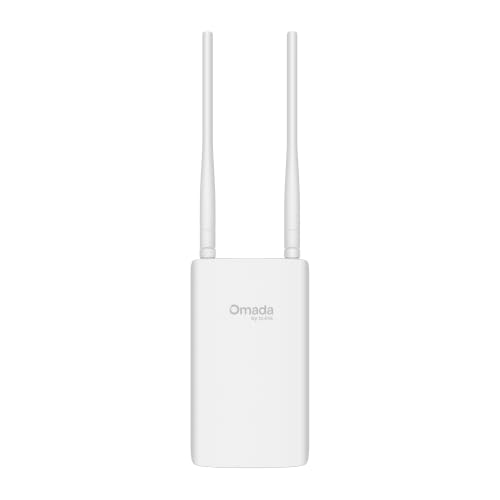
Covering outside is not a Wi-Fi problem, it is a mounting problem. The decision is which weather rating you need and whether the power supply comes in the box.
How this page is funded: some links here are affiliate links, and Mesh & Signal earns a commission if you buy through them. It costs you nothing extra, it never changes which product we rank first, and we do not publish a price we have not verified. Full disclosure.
The outdoor access point to buy is the TP-Link Omada EAP650-Outdoor. It pairs the higher IP68 weather rating with an AX3000 Wi-Fi 6 radio and ships the PoE injector in the box, which means one Ethernet run and an indoor plug is the entire install. The budget pick is the Omada EAP225-Outdoor: Wi-Fi 5 at AC1200, IP65, injector included, and the cheapest unit here that is actually built to sit in weather. If you already run a TP-Link Deco mesh, buy the Deco X50-Outdoor instead — it joins the network you have rather than creating a second one.
Why an access point and not an extender
Outside is the one place where the usual cheap answer does not work at all. A plug-in extender has to receive a usable signal before it can repeat one, and it has to live in a socket — which means indoors, behind an exterior wall, pointing at the thing you are trying to cover. Every one of those constraints is working against you in a yard.
An outdoor access point inverts the arrangement. It is fed by a cable, so its link back to the router is not competing for airtime with your devices, and it is mounted on the outside of the building, so the wall is behind the radio instead of in front of it. That is the whole reason this category exists, and it is why the halving that affects every wireless repeater does not apply here.
The cost is the cable. Every unit on this page needs an Ethernet run from somewhere inside the house to wherever you mount it, and that run is the real work of the project — not the hardware, and not the configuration.
What we ranked on
Outdoors, the specification sheet matters much less than it does indoors, because distance and line of sight decide throughput long before the radio class does. So the ranking is built on four things, in this order:
Weather rating. IP68 is the higher of the two ratings TP-Link ships on these units; IP65 is the lower. Under a soffit or an eave, IP65 is fine. Fully exposed on a pole or a fence post, pay for IP68.
The radio. Wi-Fi 6 brings WPA3 and better handling of a crowded device count. It does not bring range — transmit power is regulated and identical across all of these.
Install effort. Specifically whether the PoE injector is in the box. If it is, you need one cable and an indoor socket. If it is not, you need a PoE switch or a separate injector, which is another purchase and another decision.
Value at the job. A yard full of phones and a doorbell camera is not a demanding network. Spending flagship money on it is the most common mistake here.
The five, side by side
Unit
Radio
Weather rating
Injector
TP-Link Omada EAP650-Outdoor
Wi-Fi 6, AX3000
IP68
Included
TP-Link Omada EAP610-Outdoor
Wi-Fi 6, AX1800
IP68
802.3at PoE, or passive adapter in box
TP-Link Omada EAP603-Outdoor
Wi-Fi 6, AX1800
IP65
Included
TP-Link Deco X50-Outdoor
Wi-Fi 6, AX3000
Weatherproof Deco node
PoE or AC
TP-Link Omada EAP225-Outdoor
Wi-Fi 5, AC1200
IP65
Included
Manufacturer-published specifications as they appear on each product's own verified listing; see Sources. 'Injector' is whether the PoE power supply is included in the box.
Scroll the table sideways to see every column.
Why this page is all one brand, and what that means
We would rather this list were more varied, and it is worth being straight about why it is not. At household prices the outdoor access point category is essentially TP-Link's Omada line. When we checked the alternatives for this page, the obvious Ubiquiti candidate was only listed as multi-unit packs at a price no home needs, and its cheaper sibling was not in stock as a single unit at all. Rather than rank something unbuyable, or pad the list with an indoor unit in a weatherproof box, the page stops at what you can actually purchase today.
Practically, that also simplifies the decision: all four Omada units are managed by the same free controller, mesh and roam with each other, and work behind any brand of router — so the choice really is just rating, radio and price.
Worth knowing
Mount it on the house, not on the thing you want to cover
The instinct with a detached garage or a far corner of a yard is to run the cable all the way out there. Usually the better install is a short exterior run on the house, with the access point mounted high and aimed at the target. Open air is the easiest thing Wi-Fi ever has to cross; one clear line of sight beats a long trench. Covering a garage works through that choice for the specific case of a separate building, including the two wired routes that need no cable at all.
What an outdoor access point will not fix
It will not improve the inside of the house. People sometimes buy one hoping that a stronger radio on the exterior wall will push through into the back bedroom; it does not work that way, because the unit is pointing outward and the wall is still a wall. If the problem is indoors, you want an indoor access point or a mesh system, and finding the dead zone first is free.
It also will not give you internet in a place the cable cannot reach. There is no wireless answer to a building 200 feet away with trees in between that does not involve a point-to-point bridge, which is a different product class and a different page.
What to buy
Fully exposed mount, want the best: Omada EAP650-Outdoor.
You have a PoE switch already: Omada EAP610-Outdoor.
Under an eave, want to spend less: Omada EAP603-Outdoor.
Already running Deco: Deco X50-Outdoor.
Smallest sensible spend: Omada EAP225-Outdoor.
How we picked
We do not run a test lab. Rankings here are built from the manufacturers' published specifications, measurements taken by independent outlets that do have labs, and the structural reasoning on this site about what a given house or job actually needs. Every product was checked as currently sold before it was included. Where a figure appears it is attributed and linked in Sources; where we have no basis for a claim, it is left out. Our methodology sets out exactly what we will and will not assert.
Quick picks
Ranked by our published scoring rubric (weather rating, radio, install effort, value). Tap any row to jump to the full write-up, or go straight to the retailer from the right-hand column. How we score.
#
Product
Best for
Score
Price
1
TP-Link Omada EAP650-OutdoorAX3000 Wi-Fi 6 in an IP68 enclosure with the PoE injector in the box, so the whole install is one Ethernet run and an indoor socket. The highest weather rating and the fastest radio here in the same unit.
The best outdoor coverage you can mount in an afternoon
TP-Link Omada EAP610-OutdoorAX1800 Wi-Fi 6, also IP68, powered by 802.3at PoE or the passive adapter in the box. The pick if you are wiring more than one access point and want them all fed from a switch.
TP-Link Omada EAP603-OutdoorAX1800 Wi-Fi 6 with WPA3 and a bundled injector at an IP65 rating. Under an eave or a soffit, nothing on this page will outperform it in a way you can feel.
TP-Link Deco X50-OutdoorNot a standalone access point but a weatherproof Deco node: it joins an existing Deco network, so there is no second network name and roaming keeps working. Useless to anyone not running Deco.
TP-Link Omada EAP225-OutdoorThe budget pick. AC1200 Wi-Fi 5, IP65, injector included — a real weatherproof access point rather than an indoor extender in a plastic box, which is the only comparison that matters at this price.
The cheapest unit that is genuinely built for outside
Prices as of November 28, 2026, read from each product's own Amazon listing; Amazon prices change often. Scroll the table sideways on a narrow screen. Scores are our editorial assessment from published specifications and independent testing by named outlets — not our own lab results. What we do and do not test.
The picks in full
#1 · The best outdoor coverage you can mount in an afternoon
TP-Link Omada EAP650-Outdoor
TP-Link · Premium
The outdoor access point to buy if the yard matters: AX3000 Wi-Fi 6 in an IP68 enclosure, with the PoE injector in the box so no special switch is needed.
Key specifications
Standard
Wi-Fi 6, AX3000 dual-band
Weatherproofing
IP68
Power
PoE injector included in the box
Management
Omada, with mesh and roaming; WPA3
Score 9.3/10
Weather rating10.0
Radio9.5
Install effort9.0
Value8.5
What it gets right
+IP68 is the higher of the two outdoor ratings TP-Link ships, and this is the cheapest AX3000 unit carrying it
+The injector in the box means one Ethernet run and an indoor plug is the whole install — no PoE switch to buy
+Works behind any brand of router, so it does not lock you into a mesh ecosystem
What to watch for
−Still needs a cable run to wherever you mount it, which is the real cost of every outdoor access point
−Omada's controller is free but expects you to think about a network rather than tap a phone app
#ad Price as of November 28, 2026; Amazon prices change often. How we are funded.
Common questions
What is the best outdoor access point?+−
The TP-Link Omada EAP650-Outdoor. It combines the higher IP68 weather rating with an AX3000 Wi-Fi 6 radio and includes the PoE injector, so the install is one cable and an indoor socket. The Omada EAP603-Outdoor is the value pick for a sheltered mount, and the EAP225-Outdoor is the cheapest unit here genuinely built for outdoor use.
Do I need IP68, or is IP65 enough?+−
IP65 is enough for a unit mounted under an eave, a soffit or any overhang that keeps direct rain off it, which covers most house installs. Pay for IP68 when the access point will be fully exposed — on a pole, a fence post or a flat exterior wall with nothing above it. The rating is the main reason to spend more on this page; the radio class is not.
Can I use an outdoor access point with any router?+−
Yes, for the four Omada units — they work behind any brand of router, which is the main advantage of an access point over a brand-matched mesh node. The exception on this page is the Deco X50-Outdoor, which is a Deco node and requires an existing TP-Link Deco network to join.
Do I have to run an Ethernet cable?+−
For an access point, yes — the wired uplink is the entire reason it outperforms a wireless extender outdoors. If running a cable is genuinely impossible, the alternatives are a wired link over existing coax or mains and then a unit at the far end, or a weatherproof mesh node like the Deco X50-Outdoor placed within good range of an indoor node. Our garage page covers the no-new-cable routes.