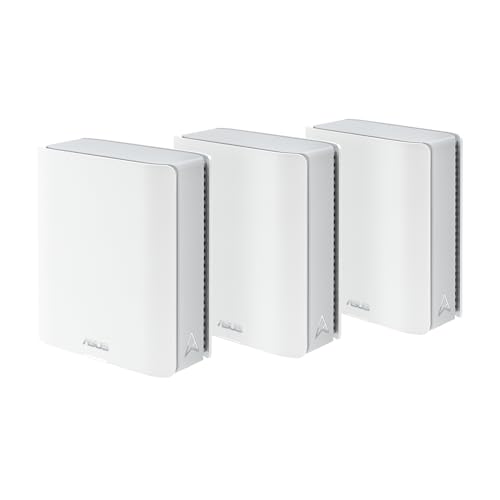
A full 6 GHz radio at the bottom of the tri-band ZenWiFi range, wired up with Gigabit LAN ports. Whether that trade works depends entirely on whether you were going to run cable.
How this page is funded: some links here are affiliate links, and Mesh & Signal earns a commission if you buy through them. It costs you nothing extra, it never changes which product we rank first, and we do not publish a price we have not verified. Full disclosure.
Buy the ZenWiFi BT6 if you want ASUS's subscription-free feature set and a real 6 GHz radio for the least money, and your nodes are going to talk to each other over the air. Do not buy it if you were planning to run Ethernet between units, because its LAN ports are Gigabit and that wired link will be slower than the wireless one it replaces. That is an unusual sentence to write about a mesh system, and it is the whole assessment.
What ASUS actually sells here
The ZenWiFi BT6 is a tri-band Wi-Fi 7 system in the BE9400 class. ASUS publishes 688 Mbps on 2.4 GHz, 2,882 Mbps on 5 GHz and 5,762 Mbps on 6 GHz, for the 9.4 Gbps figure on the box. All three radios are 2x2, there are seven internal antennas per unit, and channel widths run to 320 MHz with 4096-QAM. Each unit has 1 GB of RAM and 128 MB of flash.
Coverage is rated at up to 3,000 square feet and four-plus rooms per unit, and up to 5,800 square feet and five-plus rooms as a two-pack. ASUS publishes no three-pack figure; the US retail listing for the three-pack advertises 7,600 square feet, which is roughly what you get by extrapolating the per-unit number. Treat all three figures the way you should treat any published coverage rating — as a way to rank systems against each other, not as a promise about your house. Our sizing method is in how many mesh nodes you actually need.
Operating modes are the usual ASUS set: wireless router, AiMesh node and access point. AiProtection, parental controls, Adaptive QoS, guest networks, Instant Guard and a VPN client and server — WireGuard, OpenVPN, L2TP, PPTP, IPSec, plus VPN Fusion for per-device routing — are all included rather than subscribed to, which remains the single best reason to buy any ZenWiFi.
The ports: what the listing says, and what ASUS says
This needs saying plainly because the retail listings are a mess. The US Amazon listing title for the BT6 three-pack advertises "10G Port x2". The listing title for the BT6 one-pack, the same hardware, advertises "1G Port x4". ASUS's own tech-spec page for the model lists one 2.5G WAN port, three 1G LAN ports and one USB 3.0 port per unit, and its product page repeats the single 2.5G WAN.
The manufacturer's specification is the one to believe. There are no 10 Gigabit ports on a ZenWiFi BT6. If you have been cross-shopping it against the BT10 on the strength of that listing title, the comparison you were making does not exist.
BT6
BT8
BT10
WAN
One 2.5G
One 2.5G
One 10G (WAN/LAN)
Fastest LAN
1G
2.5G
10G
Other LAN
Two further 1G
Two 1G
Three 1G
USB
One USB 3.0
One USB 3.0
One USB 3.0
Wired backhaul ceiling
1 Gbps
2.5 Gbps
10 Gbps
Wired I/O across the tri-band ZenWiFi range, per unit, from each model's ASUS specification.
Scroll the table sideways to see every column.
That last row is the consequence that matters. On the BT8 or BT10, running a cable between units is the upgrade — it takes the node-to-node traffic off the air entirely and gives each satellite a clean 2.5 or 10 Gbps uplink. On the BT6, a Gigabit cable is slower than a good 6 GHz wireless hop, so wiring the nodes can make the system worse. Ethernet backhaul for mesh explains the general case, and this is the exception to it.
This usually backfires
Do not buy the BT6 for a wired backhaul
If your house has Ethernet in the walls, or coax you can put a MoCA pair on, that cabling is the most valuable thing you own and you should buy a system that can use it. The BT8 is the cheapest ZenWiFi that can — one 2.5 Gbps LAN port per unit is all it takes. Spending the difference there buys you more than any radio upgrade will. Mesh systems with the best Ethernet ports ranks the field on exactly this.
Where the third radio earns its money
With the wired option off the table, the question becomes whether the 6 GHz radio is worth paying for over a cheaper dual-band system. In a wireless-backhaul house it is, and this is the clearest case for the BT6.
A dual-band mesh sends every byte a satellite relays twice over the same 5 GHz band — once from your laptop to the node, once from the node to the router. Roughly half the throughput on anything connected to a satellite disappears into that. A tri-band system has a third radio available for the node-to-node conversation, so your devices keep the 5 GHz band to themselves. Tri-band vs dual-band mesh is the decision in full, and how mesh backhaul works does the arithmetic.
One caveat, and ASUS is honest about it on its own page: the BT6 does not reserve 6 GHz for the backhaul. Smart AiMesh uses Multi-Link Operation to aggregate or switch across bands rather than holding one back, so 6 GHz is available to your devices too and the split is dynamic. In practice that is a better arrangement than a fixed reservation when your clients are close to a node, and a worse one when they are competing with a long backhaul hop. It is the same arrangement the BT8, BT10 and the tri-band Orbi 770 use; only quad-band systems like the ZenWiFi BQ16 Pro and the Orbi 970 give the backhaul a 6 GHz radio of its own.
The 2x2 question
Every radio on the BT6 is 2x2, where the BT8 is 4x4 on 5 GHz and 6 GHz and the BT10 is 4x4 on the fast bands as well. The per-band numbers show it directly: 5,762 Mbps at 6 GHz against the BT8's 8,643 and the BT10's 11,529.
Two things follow, and only one of them is bad news. The bad news is that the backhaul hop has less headroom, so a satellite placed at the edge of its range gives back more. The news that is not bad: almost no client device in your house is more than 2x2 either. Phones are 2x2. Most laptops are 2x2. A 4x4 router mainly helps when several 2x2 clients are active at once, through MU-MIMO, which is a real but modest effect in a normal household. If you are picking between the BT6 and the BT8, pick on the ports, not the streams.
Coverage and node count, read honestly
Configuration
ASUS's rating
A sensible real-world target
One unit
Up to 3,000 sq ft, 4+ rooms
A 1,200-1,600 sq ft floor
Two units
Up to 5,800 sq ft, 5+ rooms
A 2,000-2,600 sq ft house
Three units
No ASUS figure; 7,600 sq ft on the US listing
A 2,600-3,600 sq ft house, or two floors plus a basement
ASUS's published coverage for the BT6, and what we would actually plan for.
Scroll the table sideways to see every column.
The right-hand column is our estimate rather than a measurement, and it assumes ordinary interior construction. Plaster and lath, foil-backed insulation, brick or a concrete slab between floors all move it down sharply — mesh for concrete and brick walls and whether Wi-Fi goes through concrete cover why. ASUS publishes no concurrent-device rating for the BT6 at all, which is worth knowing before you commit a house full of smart plugs and cameras to it; how many devices a router can handle explains why airtime, not the association limit, is what runs out first.
Try this first
Three units in the box is the real value here
The BT6 is sold as a three-pack in the US, and at the time of checking that pack was the only configuration reliably in stock — the one-pack showed "Temporarily out of stock" and the two-pack had no live listing. Three tri-band nodes is a genuinely useful amount of hardware for a two-story house, and it is the thing the price is buying. Compare it against two-packs on cost per covered node rather than on the headline price.
Who should buy it
A 2,500-3,500 sq ft house with no Ethernet in the walls. Three tri-band nodes, wireless backhaul, no cable to run. This is the case the BT6 is built for.
Anyone who refuses to rent router features. The full AiProtection, parental control and VPN set is included, which is the ZenWiFi line's standing argument — mesh with no subscription ranks the field on it.
A sub-gigabit internet plan. The 2.5G WAN port clears anything up to a gigabit comfortably, and the Gigabit LAN ports are not a constraint you will meet.
Someone already inside AiMesh. It will join an existing ASUS mesh as a node, which makes it a cheap way to extend one.
Who should not
Anyone with usable cabling. Buy the BT8. A Gigabit backhaul on a tri-band system is money spent to go backwards.
Multi-gig plans. One 2.5G WAN port is the ceiling, and nothing downstream of it is faster than a gigabit. Multi-gig ports explained does the overhead arithmetic.
Houses with several wired devices in one room. Three Gigabit LAN ports per unit is enough sockets and not enough speed; a desk with a NAS on it wants the BT8 or a Deco BE63.
Anyone who bought it for the 10G ports. They are not there. The listing is wrong.
How we picked
We do not run a test lab. Rankings here are built from the manufacturers' published specifications, measurements taken by independent outlets that do have labs, and the structural reasoning on this site about what a given house or job actually needs. Every product was checked as currently sold before it was included. Where a figure appears it is attributed and linked in Sources; where we have no basis for a claim, it is left out. Our methodology sets out exactly what we will and will not assert.
Quick picks
Ranked by our published scoring rubric (radio capacity, wired i/o, value, software). Tap any row to jump to the full write-up, or go straight to the retailer from the right-hand column. How we score.
#
Product
Best for
Score
Price
1
ASUS ZenWiFi BT6 (3-pack)Tri-band BE9400 — 688, 2,882 and 5,762 Mbps — with 2x2 radios, 320 MHz channel support on 6 GHz, and one 2.5G WAN against three Gigabit LAN ports.
ASUS ZenWiFi BT8Tri-band at 688 / 4,323 / 8,643 Mbps with a 2.5G WAN and a 2.5G LAN on every unit. The model to buy if you intend to wire the nodes together.
TP-Link Deco BE63Tri-band BE10000 with four 2.5 Gbps ports on every unit. More wired capability than any ZenWiFi below the BT10, with HomeShield's paid tier as the catch.
ASUS ZenWiFi BT10Two 10G ports per unit and 4x4 radios on the fast bands. Overkill in most houses, and the only ZenWiFi that will not be capped by its own Ethernet.
Prices as of November 13, 2026, read from each product's own Amazon listing; Amazon prices change often. Scroll the table sideways on a narrow screen. Scores are our editorial assessment from published specifications and independent testing by named outlets — not our own lab results. What we do and do not test.
The picks in full
#1 · A 6 GHz radio at the bottom of the range
ASUS ZenWiFi BT6 (3-pack)
ASUS · Midrange
The cheapest way into a tri-band ZenWiFi with a real 6 GHz radio — bought at the cost of every multi-gig LAN port in the range above it.
#ad Price as of November 13, 2026; Amazon prices change often. How we are funded.
Common questions
Does the ASUS ZenWiFi BT6 have 10G ports?+−
No. ASUS's own tech-spec page and product page both list one 2.5G WAN port, three 1G LAN ports and one USB 3.0 port per unit. Some US retail listings for the three-pack advertise "10G Port x2", and the listing for the one-pack of the same hardware advertises "1G Port x4" — the two contradict each other and the 10G claim is wrong. The cheapest ZenWiFi with 10G ports is the BT10.
Is the ZenWiFi BT6 tri-band?+−
Yes. It has 2.4 GHz, 5 GHz and 6 GHz radios, all 2x2, published by ASUS at 688, 2,882 and 5,762 Mbps for a BE9400 total of about 9.4 Gbps. No band is reserved for the mesh backhaul — Smart AiMesh uses Multi-Link Operation to aggregate or switch across bands instead, which is the same arrangement as the BT8 and BT10.
ZenWiFi BT6 or BT8 — which should I buy?+−
Decide on the Ethernet, not the radios. If you can run a cable between units, buy the BT8: its 2.5 Gbps LAN port makes a wired backhaul worthwhile, where the BT6's Gigabit LAN ports make it pointless. If the nodes will communicate over the air, the BT6 gives you the same software, the same three bands and three units for less, and the BT8's 4x4 radios will not show up in a house full of 2x2 phones and laptops.
How much area does the ZenWiFi BT6 cover?+−
ASUS rates one unit at up to 3,000 square feet and four-plus rooms, and a two-pack at up to 5,800 square feet and five-plus rooms. It publishes no three-pack figure; the US retail listing claims 7,600 square feet. We would plan on a three-pack comfortably handling a real 2,600 to 3,600 square foot house with ordinary interior walls, and less than that if the house has plaster, brick or foil-backed insulation.
Does the ZenWiFi BT6 need a subscription?+−
No. AiProtection with two-way intrusion prevention, parental controls, Adaptive QoS, guest networks, Instant Guard and the VPN client and server — including WireGuard and OpenVPN, plus VPN Fusion for per-device routing — are all included with the hardware. That is the ZenWiFi range's main advantage over eero, Deco and Orbi, all of which put some of the equivalent features behind a paid tier.
Can you use Ethernet backhaul with the ZenWiFi BT6?+−
You can, but on this model you usually should not. The LAN ports are Gigabit, so a wired link between units tops out at 1 Gbps — frequently slower than the 6 GHz wireless hop it would replace. Wired backhaul is the right move on the BT8 (2.5 Gbps LAN) and the BT10 (10 Gbps), and it is the main reason to step up to one of them if your house is already cabled.