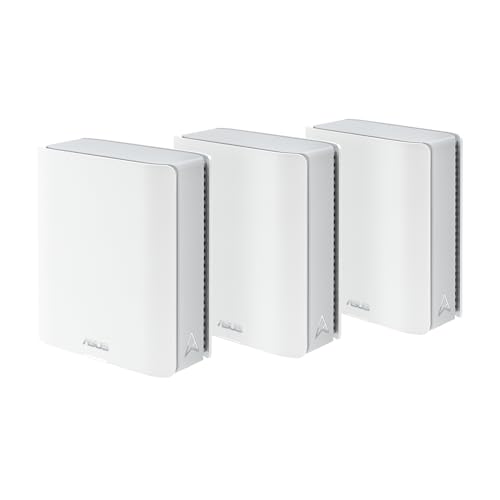
Same tri-band Wi-Fi 7 radios, same subscription-free software, same AiMesh. One difference, and it is the ports — which is exactly how to decide between the two.
How this page is funded: some links here are affiliate links, and Mesh & Signal earns a commission if you buy through them. It costs you nothing extra, it never changes which product we rank first, and we do not publish a price we have not verified. Full disclosure.
The ZenWiFi BT8 and the BT10 are the same product with different Ethernet. Buy the BT8 unless your internet plan is faster than 2.5 Gbps, or you are deliberately building a multi-gig wired backbone. That is the whole decision, and it is worth stating first because the model numbers imply a performance gap that the radios do not actually have.
What ASUS specifies
The BT8 is a tri-band Wi-Fi 7 system in the BE14000 class: ASUS publishes 688 Mbps on 2.4 GHz, 4,323 Mbps on 5 GHz and 8,643 Mbps on 6 GHz, with 2x2 streams on 2.4 GHz and 3x3 on each of the upper bands across seven internal antennas and eight high-power front-end modules. It supports multi-link operation and 4K-QAM, carries 1 GB of RAM, and runs as a wireless router, an AiMesh node or an access point.
Coverage is rated by ASUS at up to 3,000 square feet for a single unit and up to 5,900 square feet for a two-pack. Ports are the interesting part: one 2.5G WAN, one 2.5G LAN, two 1G LAN and a USB 3.0 socket per unit. There is also 4G LTE and 5G mobile tethering over that USB port, which is a more useful feature than it sounds on a rural line.
And then the software, which is the actual reason to buy a ZenWiFi. AiProtection, parental controls with time scheduling and safe browsing, DNS-over-TLS, a firewall, and both VPN client and VPN server modes are all included in the purchase. Nothing in that list is a subscription. For a household that resents paying monthly for features on hardware it already owns, that is the differentiator — and it is the same argument we make on best mesh Wi-Fi without a subscription.
BT8 versus BT10: the only line that matters
Both are tri-band Wi-Fi 7 ZenWiFi systems with the same AiMesh stack and the same included feature set. The BT10 carries two 10 Gbps ports per unit; the BT8 carries 2.5 Gbps. Everything else people expect to differ — band count, software, AiProtection, roaming behavior — does not.
Model
Bands
Fastest port
Rated coverage
Subscription for features
ZenWiFi BT8
Tri-band Wi-Fi 7 (BE14000)
2.5 Gbps
3,000 sq ft 1-pack; 5,900 sq ft 2-pack
None
ZenWiFi BT10
Tri-band Wi-Fi 7
10 Gbps
About 6,000 sq ft 2-pack
None
The ZenWiFi Wi-Fi 7 pair as ASUS specifies them, which is the comparison this purchase turns on.
Scroll the table sideways to see every column.
So the question is narrow: will anything in your house ever move more than 2.5 Gbps? For the overwhelming majority of US households the answer is no, because the plan is the limit long before the port is. Multi-gig ports explained does the arithmetic properly, and the summary is that a 2.5 Gbps port has headroom you are not using on any plan up to about 2 Gbps. If you are on a 1 Gig plan, the BT10's 10 Gig ports are buying you a number, not a result — best routers for 1 Gig internet is the sizing argument in full.
There is one real exception. If you are wiring the house for a 10 Gbps backbone — a NAS, a workstation, a switch upstream that runs at 10 Gig — then the BT10's ports are not decoration and the step up is justified. Our ZenWiFi BT10 assessment is the page for that case.
This usually backfires
AiMesh does not reserve a band for the nodes
ASUS describes the BT8's backhaul as Smart AiMesh, which uses Wi-Fi 7 multi-link operation to aggregate or switch across bands for the node-to-node link. That is clever, and it is not the same thing as a dedicated backhaul band. On a tri-band Netgear Orbi 870 one radio is held back and never serves your devices; on the BT8 the 6 GHz band is shared between the mesh and your laptops. In a large house with a long wireless hop that difference shows up as lost throughput at the far node — see what mesh backhaul actually means. Run a cable between units and the point becomes moot, which is exactly why the 2.5 Gbps LAN port is the spec to care about here.
The IoT SSID is quietly the best feature
ASUS calls it Smart Home Master: up to three separate SSIDs aimed at IoT devices. That sounds like a checkbox until you have tried to onboard a smart plug that will only commission over 2.4 GHz from a phone that is sitting on 5 GHz. A dedicated 2.4 GHz IoT network makes that problem go away permanently, and it is one of the more common reasons a smart-home setup stalls on an otherwise healthy mesh network — mesh Wi-Fi and smart home devices covers the mechanism.
It also keeps a pile of low-trust devices off the network your laptops are on, which is a reasonable thing to want and normally requires a VLAN and an afternoon.
What you give up by buying it
Three things, and none of them are hidden.
The 10 Gig ports. Discussed above. On almost every real plan this is not a loss.
A reserved backhaul band. If the house is large and cannot be wired, a system that holds a radio back — the Orbi range, for instance — will hold up better at the far node than any AiMesh system will.
Simplicity. The depth that makes ASUS worth owning is also the reason it asks more of you. If nobody in the house wants to see a QoS page, eero's software is the right answer and the feature-subscription cost is the price of that. Is eero worth it? argues the other side.
Who should buy it
Buy the ZenWiFi BT8 if your plan is 2.5 Gbps or slower, you want real parental controls and a VPN without a monthly line item, and either your house is around 3,000 to 6,000 square feet or you can run a cable between units. That is a very large share of households, which is why this is the ZenWiFi we would point most people at.
Skip it for the BT10 if you are building a 10 Gig wired backbone. Skip it for an Orbi if the house is big, unwired, and the far node has to work hard — best mesh for large homes ranks for that case. And if the budget is the binding constraint rather than the feature set, the honest answer is that a dual-band Wi-Fi 7 system wired with Ethernet beats a tri-band one that is not — Deco BE25 versus eero 7 is that bracket, and inside the ZenWiFi range the dual-band BD4 keeps two 2.5 Gbps ports per unit while the cheaper tri-band BT6 drops its LAN ports to Gigabit — which is why the BT8 is the cheapest ZenWiFi we would wire a backhaul through.
The BT8 sits in the middle of a five-model range, and the ports are the thing that separates them. The best ASUS ZenWiFi system ranks the whole range on exactly that.
How we picked
We do not run a test lab. Rankings here are built from the manufacturers' published specifications, measurements taken by independent outlets that do have labs, and the structural reasoning on this site about what a given house or job actually needs. Every product was checked as currently sold before it was included. Where a figure appears it is attributed and linked in Sources; where we have no basis for a claim, it is left out. Our methodology sets out exactly what we will and will not assert.
Quick picks
Ranked by our published scoring rubric (backhaul, wired ports, software value, coverage). Tap any row to jump to the full write-up, or go straight to the retailer from the right-hand column. How we score.
#
Product
Best for
Score
Price
1
ASUS ZenWiFi BT8Tri-band Wi-Fi 7 at BE14000 (688 / 4,323 / 8,643 Mbps) with AiProtection, parental controls and VPN included. ASUS rates it to 3,000 sq ft as a one-pack and 5,900 sq ft as a two-pack. Dual 2.5G ports.
ASUS ZenWiFi BT10Identical software story, two 10 Gbps ports per unit instead of 2.5. Worth the step up only if your plan exceeds 2.5 Gbps or you are wiring a multi-gig backbone.
Netgear Orbi 870Tri-band Wi-Fi 7 with a genuinely dedicated backhaul band, a 10 Gig internet port and four 2.5 Gbps LAN ports. The thing AiMesh does not do.
Prices as of November 13, 2026, read from each product's own Amazon listing; Amazon prices change often. Scroll the table sideways on a narrow screen. Scores are our editorial assessment from published specifications and independent testing by named outlets — not our own lab results. What we do and do not test.
The picks in full
#1 · A sub-multi-gig plan with no features rented
ASUS ZenWiFi BT8
ASUS · Premium
The ZenWiFi to buy when you want ASUS's no-subscription feature set but your internet plan will never need a 10 Gig port.
Key specifications
Standard
Wi-Fi 7, tri-band (688 / 4,323 / 8,643 Mbps)
Ports per unit
2.5G WAN, 2.5G LAN, 2 x 1G LAN, USB 3.0
Coverage
About 3,000 sq ft per unit, 5,900 sq ft as a two-pack
Software
AiProtection, parental controls and VPN with no subscription
Score 8.4/10
Backhaul7.5
Wired ports7.5
Software value9.5
Coverage8.5
What it gets right
+Every advanced feature — security, parental controls, VPN client and server — is included rather than rented
+Dual 2.5 Gbps ports per unit make a wired backhaul straightforward without paying for 10 Gig hardware
+Smart Home Master gives IoT gear its own SSID, which fixes most 2.4 GHz onboarding headaches
+Mobile tethering over 4G LTE or 5G as a fallback when the line goes down
What to watch for
−No band is reserved for the nodes — AiMesh aggregates or switches bands instead, so a long wireless hop still costs throughput
−The 2.5 Gbps WAN port caps the system below a multi-gig plan's ceiling
−The app and web UI expect more of you than eero's or Google's do
#ad Price as of November 13, 2026; Amazon prices change often. How we are funded.
Common questions
What is the difference between the ASUS ZenWiFi BT8 and BT10?+−
The Ethernet ports. Both are tri-band Wi-Fi 7 ZenWiFi systems with the same AiMesh stack, the same AiProtection and parental controls, and no subscription for features. The BT10 carries two 10 Gbps ports per unit; the BT8 carries one 2.5G WAN, one 2.5G LAN and two Gigabit LAN. Unless your plan exceeds 2.5 Gbps or you are wiring a 10 Gig backbone, the BT8 is the better purchase.
Does the ZenWiFi BT8 have a dedicated backhaul band?+−
No. ASUS describes the BT8's mesh link as Smart AiMesh backhaul, which uses Wi-Fi 7 multi-link operation to aggregate or switch across bands rather than reserving one. The 6 GHz radio serves your devices as well as the nodes. A wired backhaul over the 2.5 Gbps LAN port removes the issue entirely, and that is the setup we would recommend in any house where it is possible.
How much area does the ZenWiFi BT8 cover?+−
ASUS rates a single BT8 at up to 3,000 square feet and a two-pack at up to 5,900 square feet. Those are ceilings in favorable conditions. Walls, floors and layout matter more than the number does — how many mesh nodes you need is the sizing method we would use instead.
Does the ZenWiFi BT8 need a subscription?+−
No. AiProtection, parental controls, DNS-over-TLS and both VPN client and server modes are included in the purchase price. That is the main reason to choose a ZenWiFi over an eero or a Deco, both of which put some equivalent features behind a paid tier.
Can the ZenWiFi BT8 use an Ethernet backhaul?+−
Yes, and on this system it is the upgrade that matters most. The 2.5G LAN port on each unit will carry a wired backhaul, which removes the wireless retransmission penalty completely and frees the 6 GHz band for your devices. Our guide to Ethernet backhaul covers how to run it.