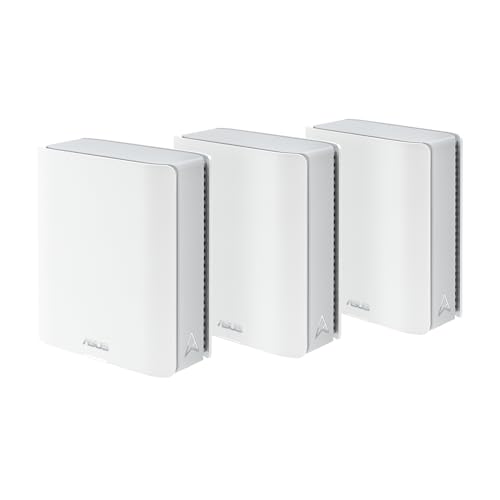
ASUS includes the security suite, the parental controls and the VPN in the box. The trade-offs are elsewhere in the specification, and they are worth knowing before you choose a model.
How this page is funded: some links here are affiliate links, and Mesh & Signal earns a commission if you buy through them. It costs you nothing extra, it never changes which product we rank first, and we do not publish a price we have not verified. Full disclosure.
Buy the ASUS ZenWiFi BT8. It is tri-band Wi-Fi 7 at BE14000 with a 2.5G WAN and a 2.5G LAN port on each unit and roughly 3,000 sq ft of coverage per unit on ASUS's own figures — the point in the range where the ports stop being the thing you regret. The budget pick is the ZenWiFi BD4: dual-band rather than tri-band, but it still carries two auto-sensing 2.5G ports per unit and ASUS publishes up to 6,500 sq ft as a three-pack. Every model here includes AiProtection, parental controls and a full VPN client and server with no subscription, which is the reason to shop this range at all.
What ASUS includes that others charge for
The ZenWiFi proposition is the firmware. Across the whole range you get AiProtection with two-way intrusion prevention, parental controls with real depth, and both VPN client and VPN server support including WireGuard — plus VPN Fusion, which routes individual devices through a tunnel while the rest of the house goes direct. None of it is behind a monthly fee. On eero or Orbi, the comparable feature sets are subscriptions, which is why our no-subscription roundup leans heavily on ASUS, and why mesh systems with VPN support does too.
The second structural advantage is AiMesh. Any AiMesh-capable ASUS router can become a node, so a ZenWiFi system can be extended later with a cheaper standalone ASUS router rather than a matching satellite. That is unusual in this category and it is worth real money over the life of the network.
What we ranked on
Radios. Band count and configuration, including whether any radio is genuinely available to the backhaul rather than shared.
Ports. The metric that separates this range. ASUS ships Gigabit LAN ports on parts of it and 10G ports on others, and the gap is larger than the model numbers suggest.
Included software. Scored for every model, and every model scores at the top, because the feature set is consistent across the range.
Value. What the premium actually buys, judged against plans and houses people really have.
The ports are the decision
System
Bands
Ports per unit
Published coverage
ZenWiFi BQ16 Pro
Quad-band Wi-Fi 7, BE30000, two 6 GHz radios
2 x 10G, 3 x 1G, USB 3.0
Per ASUS's spec page
ZenWiFi BT10
Tri-band Wi-Fi 7, up to 18,000 Mbps
2 x 10G plus a Gigabit WAN/LAN
Up to 6,000 sq ft as a two-pack
ZenWiFi BT8
Tri-band Wi-Fi 7, BE14000
2.5G WAN, 2.5G LAN, 2 x 1G, USB 3.0
3,000 sq ft per unit; 5,900 as a two-pack
ZenWiFi BT6
Tri-band Wi-Fi 7, BE9400
1 x 2.5G WAN, 3 x 1G LAN, USB 3.0
3,000 sq ft as a 1-pack; 5,800 as a 2-pack
ZenWiFi BD4
Dual-band Wi-Fi 7, 3.6 Gbps
2 x 2.5G, each auto-sensing
6,500 sq ft as a 3-pack; 4,900 as a 2-pack
ASUS's own published tech specifications; see Sources. Figures are per unit.
Scroll the table sideways to see every column.
The BT6 is the trap in that table and it is worth being explicit. It is tri-band and it is Wi-Fi 7, so it reads like a straightforward saving against the BT8 — but ASUS's own tech specs give it three Gigabit LAN ports. If you intend to wire the backhaul, or you have a multi-gig plan, or you want to plug a NAS in, the BT6 is the wrong end of the range to save money at. The BD4 gives up a radio and keeps the 2.5G ports, which for a wired house is the better trade.
Worth knowing
Smart AiMesh does not reserve a band
ASUS states that Smart AiMesh aggregates or switches backhaul across the available bands using Multi-Link Operation rather than fencing one off. In a quiet house that is better than a fixed reservation; in a busy one it means a tri-band ZenWiFi is a capacity advantage rather than a guarantee. The exception is the quad-band BQ16 Pro, whose second 6 GHz radio can be given to the mesh outright.
Which ZenWiFi for which house
Normal house, gigabit plan, want nothing missing: BT8.
Multi-gig plan or 10G switch: BT10.
Large house, wireless nodes, budget is not the constraint: BQ16 Pro.
Want tri-band cheaply and only use Wi-Fi: BT6, accepting Gigabit LAN.
Cheapest route in, or a house you can wire: BD4.
How we picked
We do not run a test lab. Rankings here are built from the manufacturers' published specifications, measurements taken by independent outlets that do have labs, and the structural reasoning on this site about what a given house or job actually needs. Every product was checked as currently sold before it was included. Where a figure appears it is attributed and linked in Sources; where we have no basis for a claim, it is left out. Our methodology sets out exactly what we will and will not assert.
Quick picks
Ranked by our published scoring rubric (radios, ports, included software, value). Tap any row to jump to the full write-up, or go straight to the retailer from the right-hand column. How we score.
#
Product
Best for
Score
Price
1
ASUS ZenWiFi BT8Tri-band Wi-Fi 7 at BE14000 with 2.5G WAN and 2.5G LAN on each unit, and ASUS's published coverage of about 3,000 sq ft per unit. The model where the ports stop being the compromise.
ASUS ZenWiFi BT10Tri-band Wi-Fi 7 with dual 10G ports per unit and up to 6,000 sq ft as a two-pack, on ASUS's own figures. Buy it for the 10G wiring, which nothing else in the range offers.
ASUS ZenWiFi BQ16 Pro (1-pack)Quad-band BE30000 with two separate 4x4 6 GHz radios, so one can be given to the mesh outright, plus two 10G ports per unit. The most capable system here and priced accordingly.
ASUS ZenWiFi BT6 (3-pack)Tri-band Wi-Fi 7 at BE9400 for less — but ASUS's own tech specs give one 2.5G WAN and three Gigabit LAN ports per unit, so the wired side is a real step down.
ASUS ZenWiFi BD4 (3-pack)Dual-band Wi-Fi 7 at 3.6 Gbps with two auto-sensing 2.5G ports on every unit and up to 6,500 sq ft as a three-pack. The budget pick, and the one to wire if you can.
Prices as of November 13, 2026, read from each product's own Amazon listing; Amazon prices change often. Scroll the table sideways on a narrow screen. Scores are our editorial assessment from published specifications and independent testing by named outlets — not our own lab results. What we do and do not test.
The picks in full
#1 · The ZenWiFi most houses should buy
ASUS ZenWiFi BT8
ASUS · Premium
The ZenWiFi to buy when you want ASUS's no-subscription feature set but your internet plan will never need a 10 Gig port.
Key specifications
Standard
Wi-Fi 7, tri-band (688 / 4,323 / 8,643 Mbps)
Ports per unit
2.5G WAN, 2.5G LAN, 2 x 1G LAN, USB 3.0
Coverage
About 3,000 sq ft per unit, 5,900 sq ft as a two-pack
Software
AiProtection, parental controls and VPN with no subscription
Score 9.0/10
Radios9.0
Ports8.5
Included software10.0
Value8.5
What it gets right
+Every advanced feature — security, parental controls, VPN client and server — is included rather than rented
+Dual 2.5 Gbps ports per unit make a wired backhaul straightforward without paying for 10 Gig hardware
+Smart Home Master gives IoT gear its own SSID, which fixes most 2.4 GHz onboarding headaches
+Mobile tethering over 4G LTE or 5G as a fallback when the line goes down
What to watch for
−No band is reserved for the nodes — AiMesh aggregates or switches bands instead, so a long wireless hop still costs throughput
−The 2.5 Gbps WAN port caps the system below a multi-gig plan's ceiling
−The app and web UI expect more of you than eero's or Google's do
#ad Price as of November 13, 2026; Amazon prices change often. How we are funded.
Common questions
Which ASUS ZenWiFi should I buy?+−
The ZenWiFi BT8 for most houses: tri-band Wi-Fi 7 at BE14000, a 2.5G WAN and a 2.5G LAN port per unit, and about 3,000 sq ft of coverage per unit on ASUS's figures. Step up to the BT10 for 10G ports, up to the quad-band BQ16 Pro if you want a 6 GHz radio dedicated to the backhaul, and down to the BD4 if you want the cheapest ZenWiFi that is still worth owning.
Do ASUS ZenWiFi systems need a subscription?+−
No. Across the range, AiProtection, the parental controls and both VPN client and server support are included with the hardware and have no monthly fee. That is the main structural reason to buy ASUS over eero or Orbi, where equivalent features are subscriptions.
Is the ZenWiFi BT6 or the BD4 the better buy?+−
It depends on whether you will use Ethernet. The BT6 has a third radio but ASUS's specs give it three Gigabit LAN ports; the BD4 has only two radios but two auto-sensing 2.5G ports on every unit. If the nodes will be wireless, take the BT6 for the extra radio. If you can run a cable between nodes, or you have a plan faster than a gigabit, the BD4 is the better hardware.
Can I add a cheaper ASUS router to a ZenWiFi mesh?+−
Yes. AiMesh lets any AiMesh-capable ASUS router join as a node, so you can extend a ZenWiFi system later with a standalone ASUS router rather than buying a matching satellite. The network runs at the capability of the weakest node on the path, so use the newer units where the demand is.